



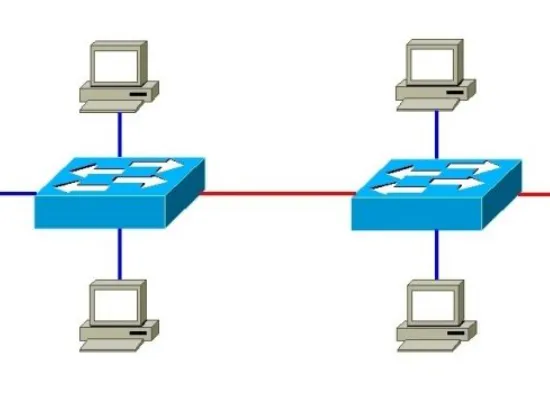
In switched networks—especially those built around VLANs—knowing the distinction between trunk ports and access ports is essential. Both types of ports play important roles in how data is carried across a LAN, but they function very differently. Understanding these differences helps you design a cleaner, more secure, and more efficient network.
What Is an Access Port?
An access port connects end-user devices—such as PCs, printers, or IP phones—to a single VLAN. It handles only one VLAN at a time, making it a straightforward choice for connecting devices that don’t need awareness of network segmentation.
Key Traits of Access Ports
- Single VLAN operation: Every access port belongs to one VLAN, and all traffic through it is associated with that VLAN.
- Untagged frames: Packets move through an access port without VLAN tags. The switch takes care of assigning them to the correct VLAN internally.
- Designed for end devices: Workstations or simple networked equipment plug into access ports because they don’t need to manage VLAN information.
Benefits of Access Ports
Access ports are easy to configure and naturally limit communication to one VLAN, which helps reduce mistakes and improves security. Devices connected to them don’t require any VLAN configuration, keeping setup simple.
What Is a Trunk Port?
A trunk port is built to carry traffic from multiple VLANs simultaneously. These ports are commonly used to link switches together, allowing VLANs to span across the network.
Key Traits of Trunk Ports
- Multi-VLAN support: One trunk port can transport data from many VLANs over a single cable.
- Tagged traffic: VLAN tags—usually following the IEEE 802.1Q standard—identify which VLAN each frame belongs to.
- Critical for switch-to-switch links: Trunks enable shared VLANs across different switches, making them vital for scalable network designs.
Benefits of Trunk Ports
Using trunk ports reduces the need for multiple physical links and keeps larger networks simpler and cleaner. They allow VLANs to stretch across buildings, campuses, or multi-floor layouts, enabling unified traffic flow while maintaining segmentation.
How VLAN Tagging Fits In
VLAN tagging determines how a switch interprets incoming data.
- Access ports: Pass frames untagged. The switch automatically assigns each frame to the port’s VLAN.
- Trunk ports: Keep VLAN tags on frames so the switch knows where each packet belongs before forwarding it. The tag is usually removed when the frame reaches an access port at the destination.
Configuring Access and Trunk Ports
Setting Up an Access Port
- Assign it to a specific VLAN.
- Avoid using the default VLAN for security reasons.
- Apply optional protections such as MAC filtering or port security.
Setting Up a Trunk Port
- Set the port’s mode to trunk.
- Specify which VLANs are allowed through the link.
- Choose a native VLAN—usually reserved for management traffic and kept separate from user traffic.
- Apply pruning and other security features to reduce unnecessary VLAN exposure.
When to Use Access Ports vs. Trunk Ports
Access Ports—Best For:
- Offices and classrooms
- Desktop computers, printers, VoIP phones
- Devices requiring a simple connection to one VLAN
Trunk Ports—Best For:
- Connecting switches in a building or across multiple buildings
- Linking routers, firewalls, or distribution-layer switches
- Data centers or large multi-VLAN environments
Security Considerations
Access Port Security Tips
- Restrict each port to one VLAN
- Enable port security or MAC address limits
- Disable unused ports entirely
Trunk Port Security Tips
- Avoid using the native VLAN for user traffic
- Allow only necessary VLANs through the trunk
- Use VLAN pruning to limit exposure
- Keep trunk ports tightly controlled, as misconfigurations can open doors for VLAN hopping attacks
Final Thoughts
Access and trunk ports are fundamental to building organized, scalable, and secure networks. Access ports keep device connectivity simple and controlled, while trunk ports provide the flexibility needed to move traffic from multiple VLANs across your infrastructure. By choosing the right port type for each part of your network and following reliable configuration practices, you can build a system that is both robust and easy to manage—whether you’re supporting a small office or a large enterprise.
